Android malware creates clones of popular apps and tricks victims
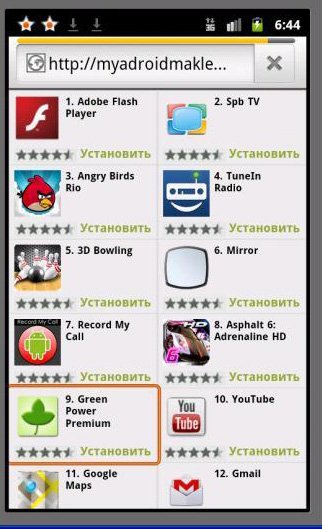
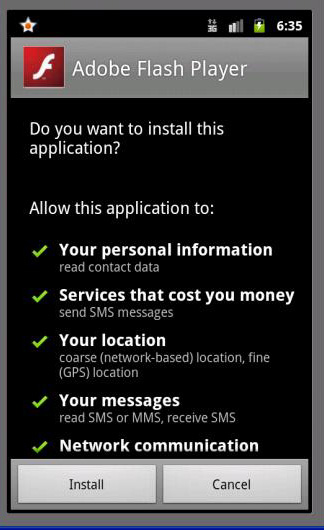
Our malware analysis team has discovered a new social engineering trick used by criminals to target Android users. The attack vector guides the victim to a fake application market (or an untrustworthy third-party source). Once there, the victim downloads clones of popular apps that are cleverly disguised. Once such an application gets downloaded, it controls the read, send and receive functionality of the SMS and MMS service of the device.
The clones that are downloaded by the victim are latest versions of genuine apps so it is quite simple for people to get fooled. In this case, the alternate market that the malware connects to is vttp://myadroidmaklet.net/.
The malware then carries out the following nefarious activities:
- Sends texts to premium rate numbers and gains revenue for the attackers
- Intercepts verification texts from third-party sources and responds to them
- Intercepts CAPTCHA images and sends them to a remote server
Detailed analysis of the malware
Once the victim is guided to the fake market he can browse freely and find around 50 popular apps that can be downloaded.
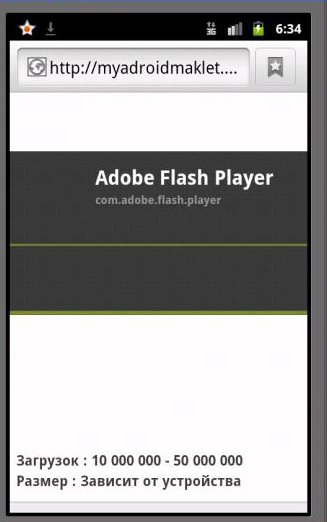
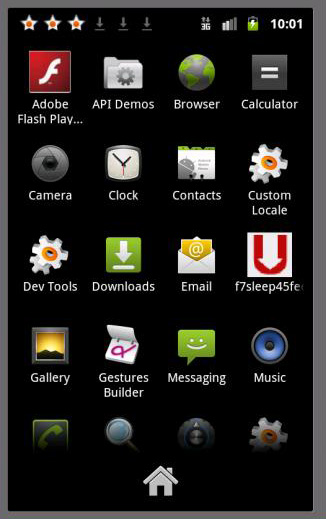
Once the victim has picked the app of his choice (Adobe Flash Player in this example) he is shown a page of authentic permissions. Once the app has been installed, two rather strange looking icons are added to the home screen.
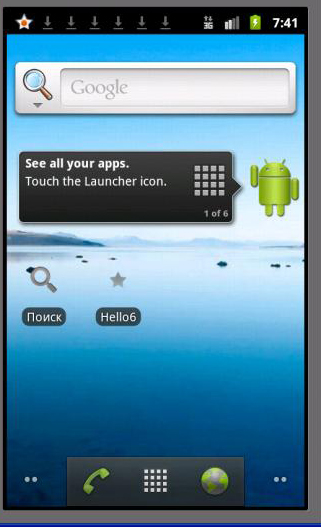
After installation, the corrupted app sends the following messages to the premium numbers mentioned:
- Sends SMS to 9999
Message text – 68295857151001760382 - Sends SMS to 6666
Message text – 68488857151001794922 - Sends SMS to 7375
Message text – 68139857131001729632 - Sends SMS to 7151
Message text – 70123384141921689572
The cloned apps that can be found are some of the most commonly used apps. There are about 50 such apps that have been successfully cloned by this malware and this creates a lot of confusion for potential victims. Here is a list of some of these apps:
- Adobe Flash Player
- Adobe Reader
- Angry Birds Rio
- Gmail
- Google+
- Google Maps
- Mozilla Firefox
- Skype
- TuneIn Radio
- Whatsapp messenger
- YouTube
Tips for safety
There are many more apps that have been successfully cloned and used to trick victims. In order to ensure safety we recommend the following steps:
- Download apps from legitimate sources only, especially Google Play.
- Deactivate the ‘sideloading’ feature. For more details click here.
- Install an effective security solution like Quick Heal Mobile Security.
- Scan apps with the security software before you download them.
The popularity of Android devices and their ability to install apps from third-party sources is a major risk for one and all. Innovative techniques like this will crop up from time to time, but the best security software and awareness will keep users protected.
Thanks to Sandip for the analysis.

18 Comments
good
nice
quick heal is very nice he is wrk is very fast ………
Thank you quick heal
Your team is doing excellent job
Just keep it up quick heal team
Keep it up
i m new to computer kindly keep on advicing me about any bad website
Hi Basant,
Keep reading the updates on our blog and website for more information. Quick Heal products will keep you protected against any threats that arise.
good job…keep it up…..
Quick Heal is very much useful to protect against anti-virus. Thank You Very Much.
dear sir my quick heal system is not getting updates from net so what should i do?
Hi Parveen,
Please visit this link – https://www.quickheal.com/supp_tic.asp.
You can file your complaint there. Our support team will get back to you with a suitable solution.
Thanks for your patience.
Quick Heal cannot scan Samsung Galaxy Note (GT-N7000)
Hi Bharat,
Please visit this link – https://www.quickheal.com/supp_tic.asp.
You can file your complaint here. Our support team will look into it and inform you about the progress.
Thanks for your patience.
Very Good
Thanks,
Really crucial and pratical info shared..!!
thanks ..!
@Vijay, @Krishna, @Panchal, @Tinu, @BP Mishra, @Jay, @Lallan, @Bajrang, @Sameer, @Adora info.: Thank you all for visiting our blog. Please check back regularly for more security news and information.
thanks quickheal team .